Request Quote
Category

News Update

News Update

HOW RADIO SIGNAL WORKS IN TELECOMMUNICATION

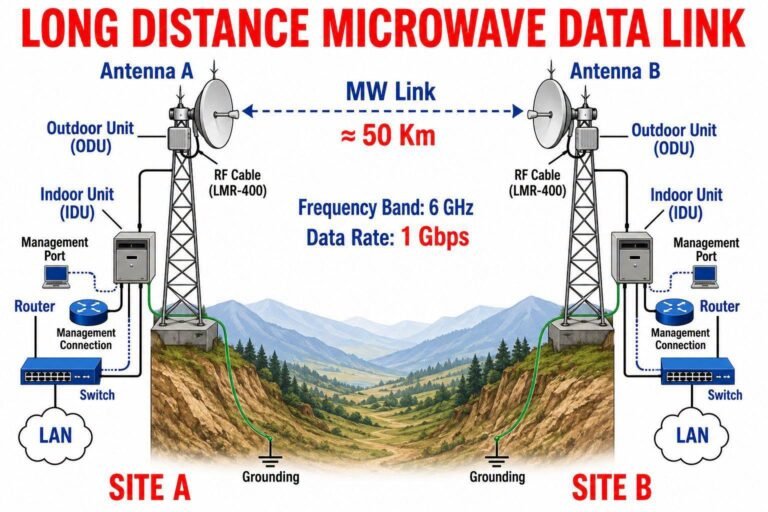
HOW RADIO SIGNAL WORKS IN TELECOMMUNICATION1. What is Radio Signal?A radio signal is an electromagnetic wave used to send information without wire.It carries voice, data, video, SMS, internet, GPS, WiFi, TV, radio, and mobile network signals.Radio signal travels through air at the speed of light.Basic formula:Speed = Frequency × WavelengthHigher frequency = shorter wavelengthLower frequency = longer wavelengthExample:700 MHz = better coverage and wall penetration1800 MHz / 2100 MHz = good for mobile network capacity2600 MHz / 3500 MHz = high data speed but shorter coverage6 GHz / 11 GHz / 18 GHz / 23 GHz = used for microwave links2. Main Parts of Radio Communication SystemA. SourceThis is where information starts.Examples:Voice from microphoneData from mobile phoneVideo from cameraInternet data from serverB. TransmitterThe transmitter prepares the signal for sending.It converts low-frequency information into radio frequency signal.C. ModulatorModulation means adding information onto a carrier wave.Common modulation types:AM = Amplitude ModulationFM = Frequency ModulationPM = Phase ModulationQPSK = Quadrature Phase Shift KeyingQAM = Quadrature Amplitude ModulationIn telecom, QPSK, 16QAM, 64QAM, 256QAM are commonly used.D. Power AmplifierIt increases the signal power before sending to antenna.E. AntennaThe antenna converts electrical signal into radio wave and sends it into the air.F. Propagation MediumThis is the path where the signal travels.Usually the signal travels through air.G. Receiving AntennaThe receiving antenna captures radio waves from the air.H. ReceiverThe receiver converts the radio signal back into useful information.I. DemodulatorDemodulation removes the carrier wave and recovers original voice, data, or video.J. OutputFinal output can be:Voice in speakerInternet data on mobileVideo on screenSMS on phone3. Step by Step Working ProcessStep 1: Information is createdExample:When you talk on mobile, your voice becomes an electrical or digital signal.Step 2: Signal processingThe device processes the signal and prepares it for transmission.Step 3: ModulationThe information is added to a high-frequency carrier wave.Step 4: AmplificationThe signal power is increased.Step 5: TransmissionThe antenna sends the signal as radio waves.Step 6: PropagationThe signal travels through air.Step 7: ReceptionAnother antenna receives the signal.Step 8: DemodulationThe receiver extracts the original information.Step 9: OutputThe user receives voice, data, or video.4. Simple Flow DiagramVoice / Data / Video ↓Signal Processing ↓Modulation ↓Power Amplifier ↓Antenna ↓Radio Wave Through Air ↓Receiving Antenna ↓Receiver ↓Demodulation ↓Original Voice / Data / Video5. How Mobile Radio Signal WorksMobile Phone → BTS / Tower → BSC / RNC / Core Network → Another Tower → Receiver PhoneWhen you make a call:Your phone sends radio signal to nearest tower.Tower receives the signal through antenna.Network routes the call to the destination.Destination tower sends signal to receiver phone.Receiver phone converts signal into voice.6. How Internet Data Works Through Radio SignalMobile Phone sends data request.Signal goes to tower through radio frequency.Tower sends data to core network.Core network connects to internet.Internet data comes back to tower.Tower sends radio signal back to phone.Phone converts it into webpage, video, or app data.7. Radio Signal Propagation TypesA. Line of SightSignal travels directly from transmitter to receiver.Used in microwave link and high-frequency systems.B. ReflectionSignal bounces from buildings, hills, or metal objects.C. DiffractionSignal bends around obstacles.D. ScatteringSignal spreads due to trees, buildings, rain, or rough surfaces.E. PenetrationSignal passes through walls or buildings.Lower frequency has better penetration.8. Important Radio Signal ParametersA. FrequencyFrequency means how many wave cycles happen per second.Unit: Hz, kHz, MHz, GHzB. WavelengthDistance between two wave peaks.C. PowerSignal strength from transmitter.Usually measured in dBm or Watt.D. BandwidthAmount of frequency space used by signal.More bandwidth means more data capacity.E. Antenna GainHow strongly antenna sends or receives signal in one direction.Unit: dBiF. RSLReceived Signal Level.It shows how strong the received signal is.G. RSSIReceived Signal Strength Indicator.Used in mobile and wireless systems.H. SINRSignal to Interference plus Noise Ratio.Higher SINR means better quality.I. SNRSignal to Noise Ratio.Higher SNR means cleaner signal.J. LatencyDelay in communication.K. InterferenceUnwanted signal that disturbs the main signal.L. NoiseUnwanted electrical or environmental disturbance.9. Frequency and CoverageLow Frequency:Better coverageBetter wall penetrationLower capacityExample:700 MHz, 850 MHz, 900 MHzHigh Frequency:Shorter coveragePoorer wall penetrationHigher capacityExample:1800 MHz, 2100 MHz, 2600 MHz, 3500 MHzVery High Frequency:Needs clear line of sightUsed for microwave linkHigh capacityExample:6 GHz, 11 GHz, 18 GHz, 23 GHz, 38 GHz10. Radio Signal in 2G, 3G, 4G, 5G2G:Used mainly for voice and SMS.Technology: GSMRadio access: TDMA / FDMA3G:Used for voice and mobile internet.Technology: UMTS / WCDMA4G:Used mainly for high-speed data and VoLTE.Technology: LTERadio access: OFDMA5G:Used for very high speed, low latency, IoT, smart city, industry.Technology: NRRadio access: OFDM11. Radio Signal ProblemsA. Weak SignalCauses:Long distance from towerLow antenna heightIndoor wall blockagePoor coverageLow transmit powerB. Call DropCauses:Weak signalHandover failureInterferenceNetwork congestionPoor indoor coverageC. Slow InternetCauses:Low SINRHigh users on same sectorWeak signalLow bandwidthBackhaul congestionD. No ServiceCauses:Tower downPower failureFiber or microwave link downSIM issueCoverage gapE. InterferenceCauses:Same frequency conflictNearby radio sourceBad antenna alignmentFaulty equipment12. Indoor Radio Signal ProblemIndoor signal becomes weak because of:Concrete wallsGlass with metal coatingBasement locationHigh-rise building shadowDistance from BTSLow frequency availabilityPoor antenna directionSolution:Indoor coverage systemDAS systemSmall cellRepeaterBetter antenna planningProper sector optimization13. Microwave Radio SignalMicrowave link uses high-frequency radio signal to connect two sites without fiber.Example:BTS Site A ↔ BTS Site BImportant requirements:Clear line of sightProper antenna alignmentGood RSLClear Fresnel zoneCorrect frequency planningEnough fade marginCommon MW frequencies:6 GHz7 GHz11 GHz13 GHz15 GHz18 GHz23 GHz38 GHzMicrowave problems:Rain fadeAntenna misalignmentObstacle in pathLow RSLInterferencePower issueODU faultIDU faultCable loss14. Fresnel ZoneFresnel zone is the invisible area around the radio path.For microwave link, this area should be clear.If trees, buildings, or towers block the Fresnel zone:RSL becomes weakLink may fluctuateCapacity may dropLink may go down during rain15. Antenna Role in Radio SignalAntenna works like the mouth and ear of wireless communication.Transmit antenna:Converts electrical signal into radio wave.Receive antenna:Converts radio wave into electrical signal.Antenna types:Omni antennaSector antennaMicrowave dish antennaPanel antennaYagi antennaIndoor ceiling antenna16. Modulation in Simple WordsModulation means carrying information by changing the radio wave.Three basic methods:Change amplitudeChange frequencyChange phaseDigital telecom uses advanced modulation:QPSK16QAM64QAM256QAMHigher modulation:More data speedNeeds better signal qualityLower modulation:Less speedMore stable in poor signal17. Example of Radio Signal JourneyWhen you watch YouTube on mobile:You press play.Phone sends request by radio signal.BTS receives it.Data goes to core network.Core network connects to YouTube server.Video data returns to mobile network.Tower sends data by radio signal.Your phone receives and plays video.18. Field Engineer Checking PointsCheck signal strength.Check RSL / RSSI.Check SINR / SNR.Check antenna alignment.Check cable and connector.Check frequency interference.Check VSWR.Check power supply.Check grounding.Check equipment alarm.Check backhaul link.Check sector load.Check handover parameters.Check indoor coverage.19. Important UnitsHz = FrequencyMHz = Million cycles per secondGHz = Billion cycles per seconddBm = Signal powerdBi = Antenna gainWatt = PowerMbps = Data speedms = LatencyBER = Bit Error RateSNR = Signal to Noise RatioSINR = Signal to Interference plus Noise Ratio20. Simple ExampleRadio signal is like sending a message using invisible waves.Transmitter says:”Here is the information.”Antenna sends it:As radio wave.Air carries it:From one place to another.Receiver catches it:And converts it back to original information.21. SummaryRadio signal is an electromagnetic wave.It carries voice, data, and video wirelessly.A transmitter creates and sends the signal.An antenna radiates the signal.The signal travels through air.A receiving antenna captures it.A receiver converts it back to useful information.Signal quality depends on frequency, power, distance, antenna, interference, obstacles, and environment.Final Flow:Information→ Signal Processing→ Modulation→ Amplification→ Antenna Transmission→ Radio Wave Propagation→ Receiving Antenna→ Receiver→ Demodulation→ Original Information

1000750229
News Update

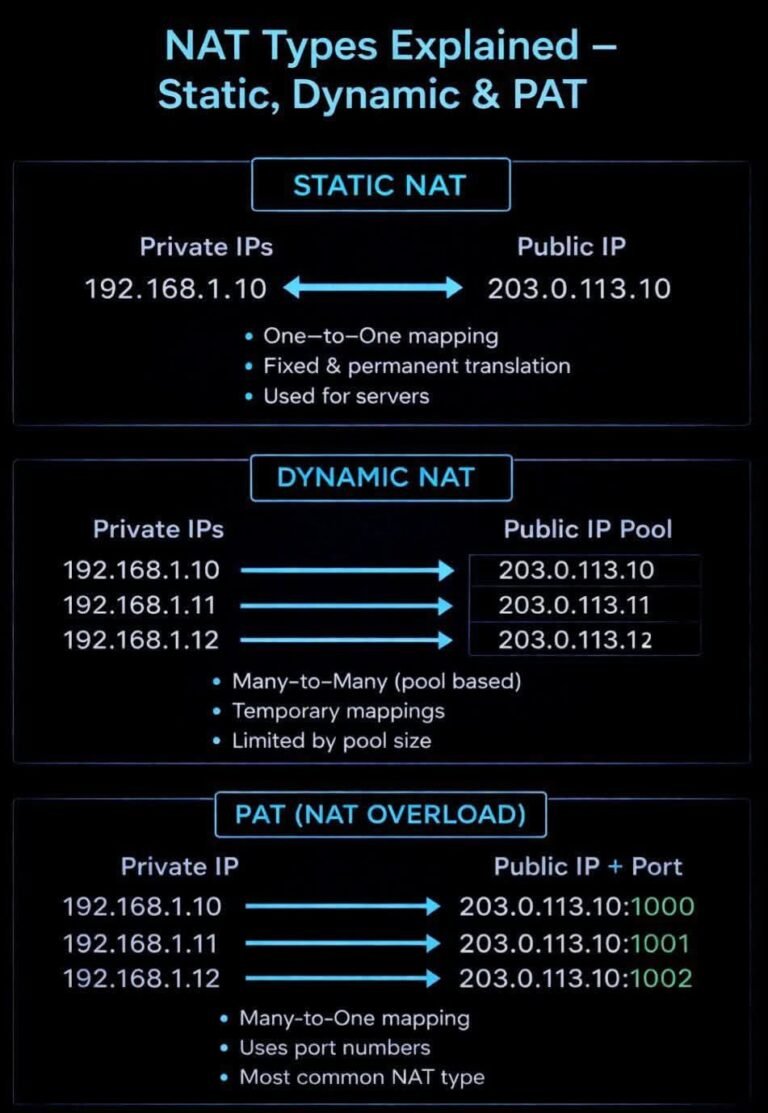
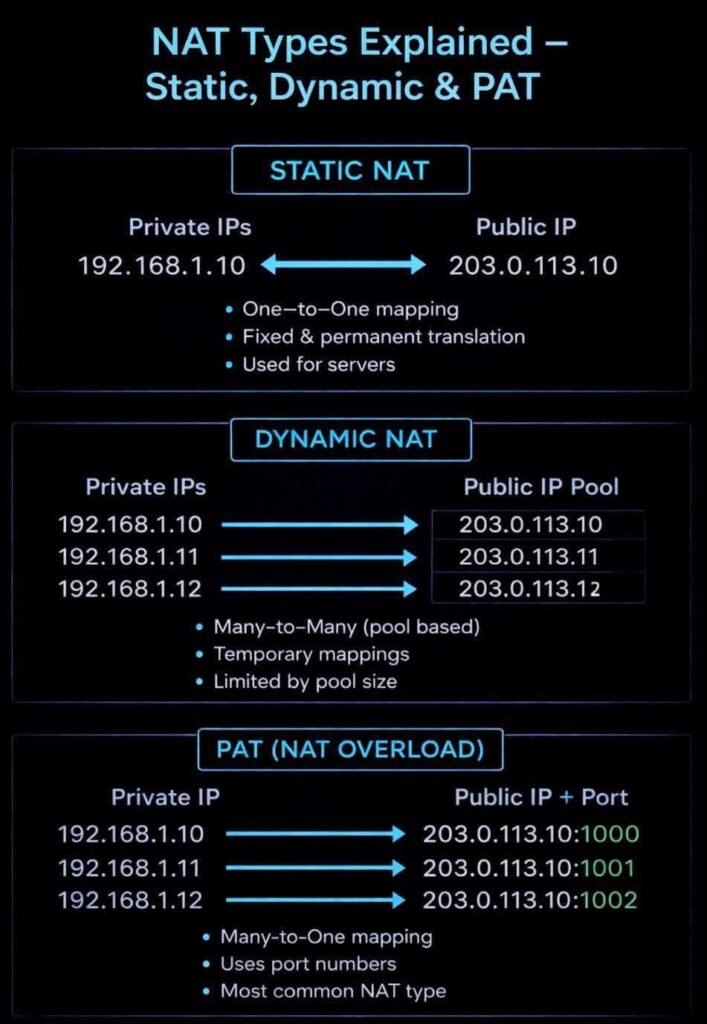
Most students get NAT wrong — do you?

Most students get NAT wrong — do you?

Static NAT, Dynamic NAT, PAT (NAT Overload)…
They look similar, but one small difference can fail your CCNA exam

*One-to-One
*Many-to-Pool
*Many-to-One (Ports)

This picture diagram explains it in 10 seconds.

Question:
Which NAT is used in home routers?
Comment your answer

CCNA #Networking #NAT #IPRouting #NetworkEngineer #ITStudents #haltech.tech #Haltec

1000750229
1000679342
News Update

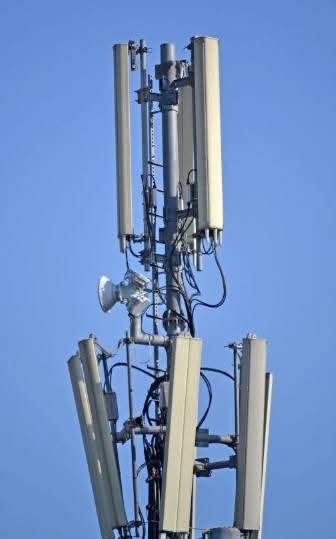
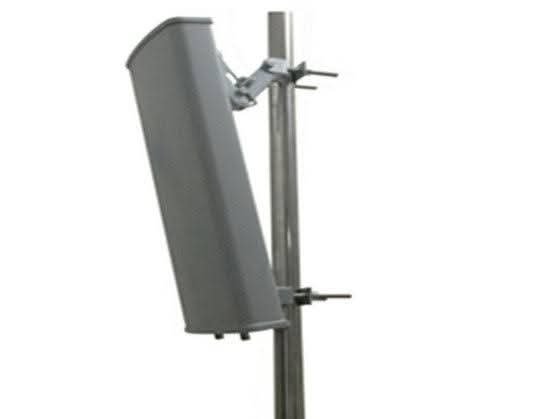
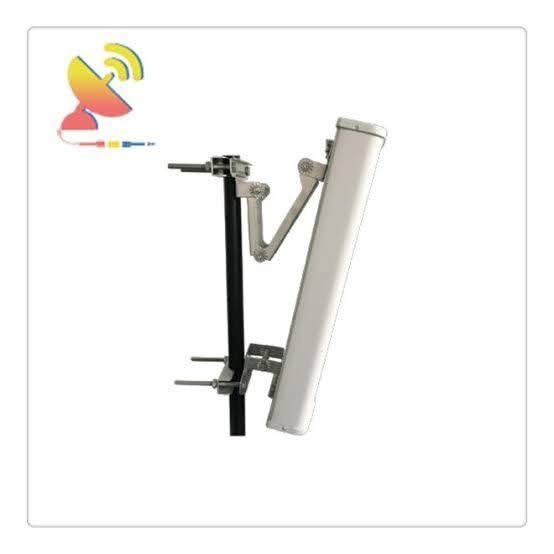
E-tilt” (electrical tilt) GSM antennas.

“E-tilt” (electrical tilt) GSM antennas are used in mobile towers because they allow network operators to remotely and dynamically optimize the coverage area and reduce interference without physically adjusting the antenna.

This method provides greater flexibility and efficiency in network management compared to manual mechanical tilting.
Key Benefits of E-Tilt Antennas

Remote Adjustability:
E-tilt (often referred to as Remote Electrical Tilt, or RET) allows engineers to change the downward angle of the antenna beam from a central office using a computer, eliminating the need for a physical site visit and manual adjustment of the mounting brackets.

Optimized Coverage and Capacity:
By precisely adjusting the tilt, operators can concentrate signal strength in high-traffic areas (e.g., a specific urban center) and minimize signal overlap with neighboring cells, which reduces interference and improves overall network quality.

Real-time Response to Network Needs:
Network conditions and traffic patterns change dynamically. E-tilt enables quick, real-time adjustments to antenna parameters, allowing the network to adapt efficiently to current demand or resolve performance issues quickly.

More Uniform Coverage Shaping:
Mechanical tilt affects the width of the coverage area unevenly (more like an ellipse), while electrical tilt provides a more uniform reduction in coverage area in the direction of the tilt (more like a shrinking circle), which can be more predictable and desirable for network planning.

Cost-Effectiveness and Safety:
While the initial cost might be higher, E-tilt saves significant operational costs associated with sending a team to physically climb the tower for adjustments, and it avoids the safety risks involved in tower climbing.

1000679342
1000679343
FB IMG 1769898581581

DNS 2048x1175 1
News Update

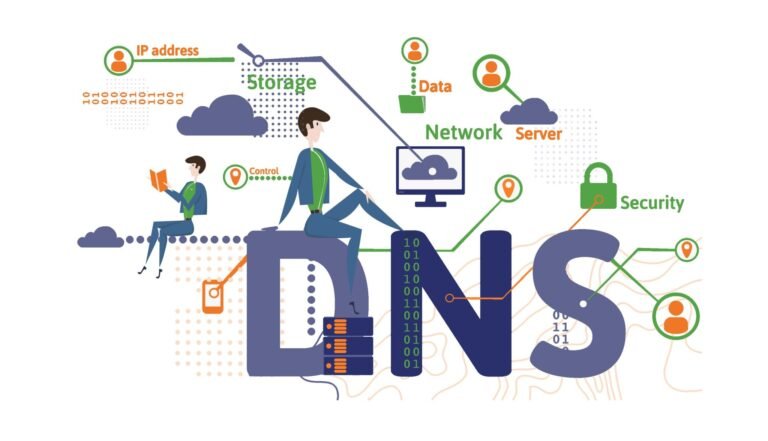
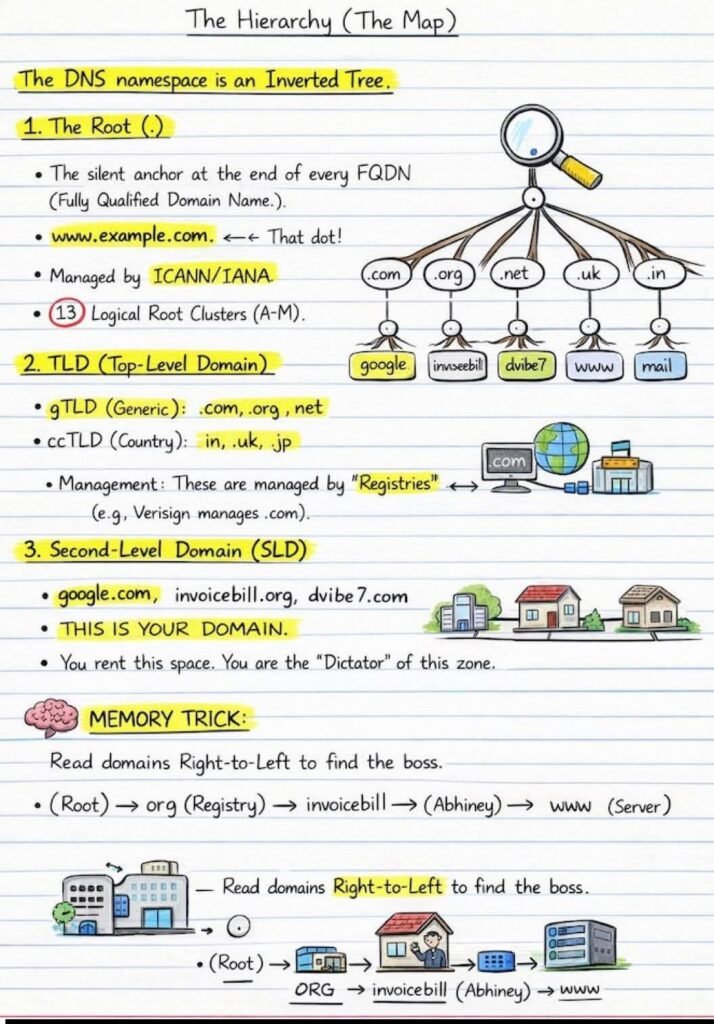
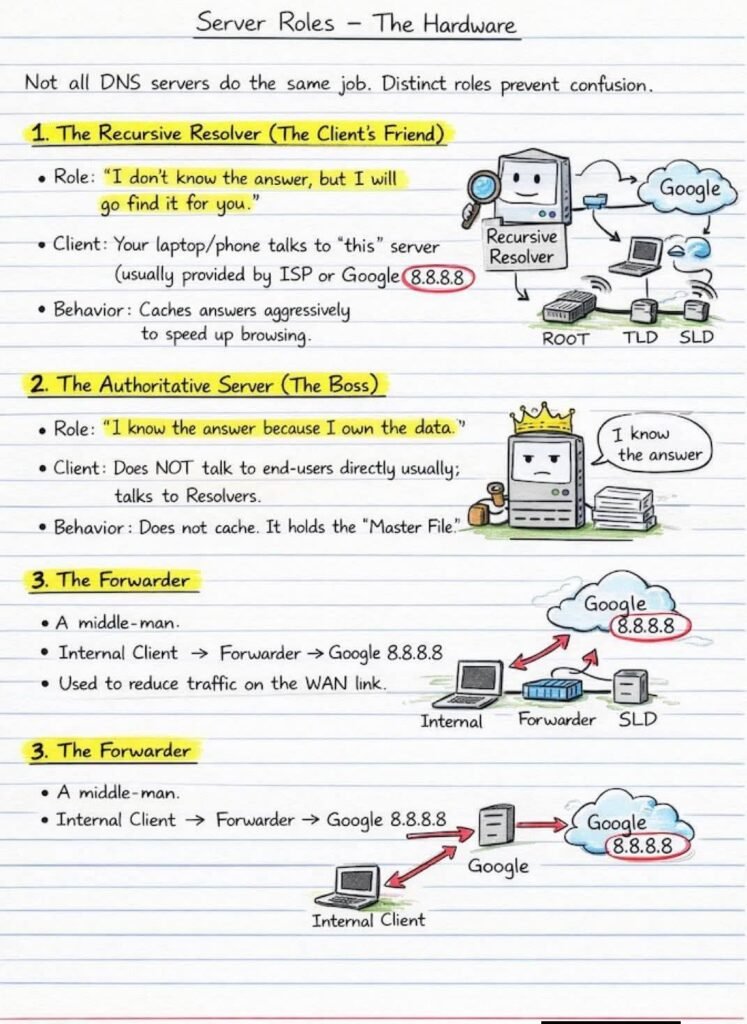
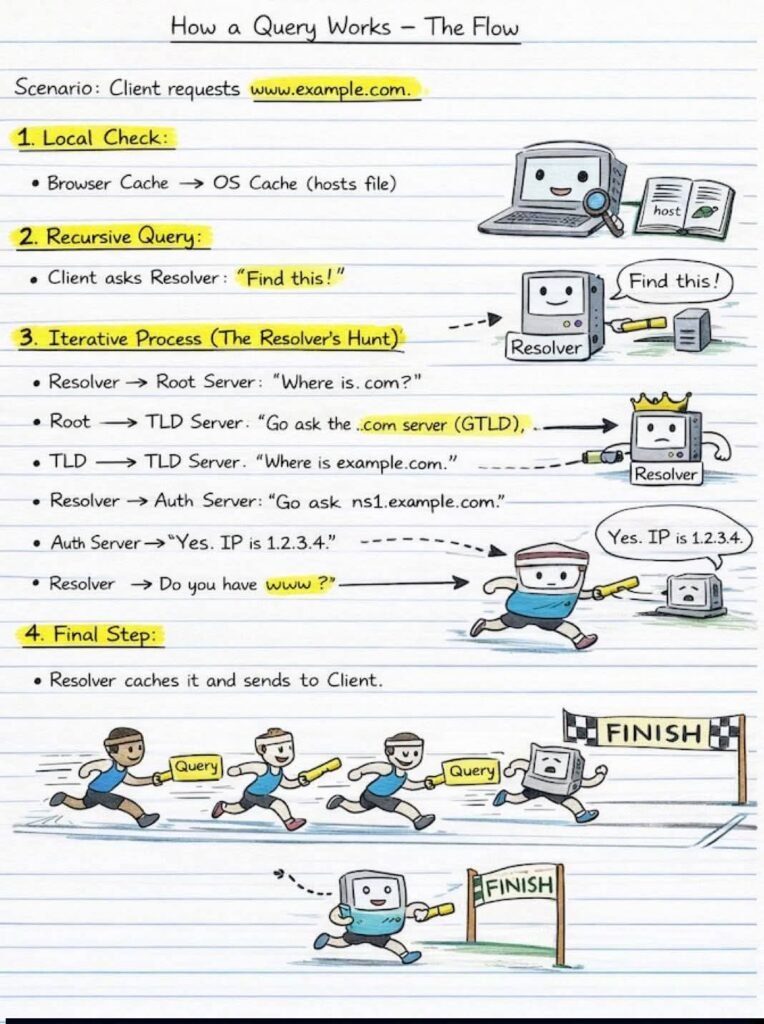
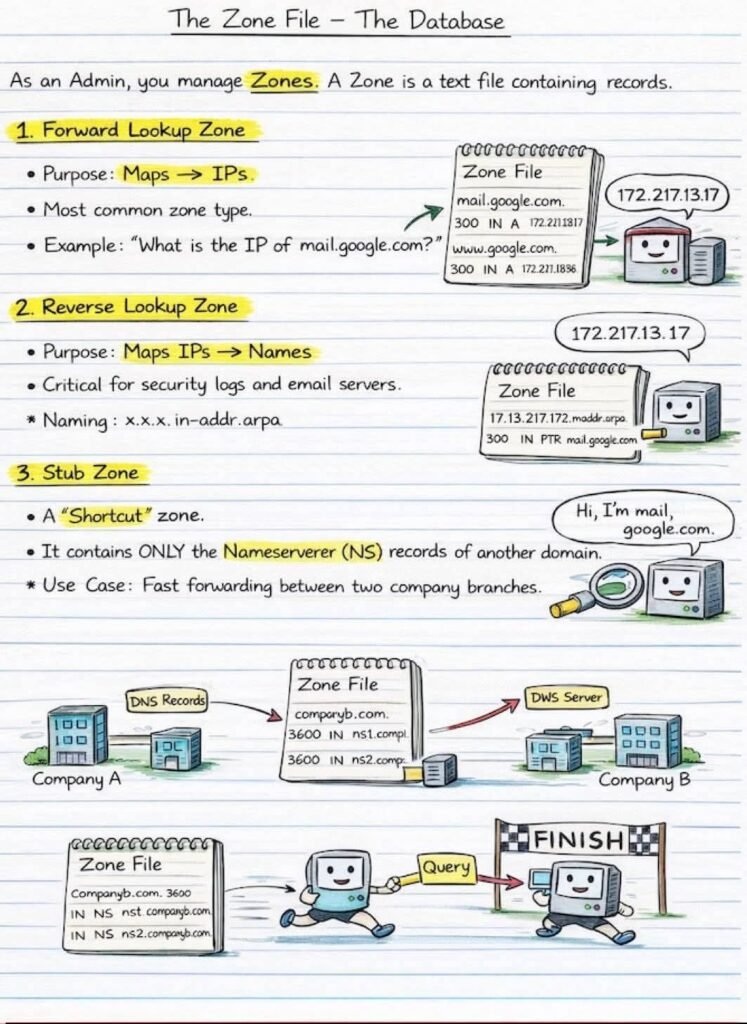
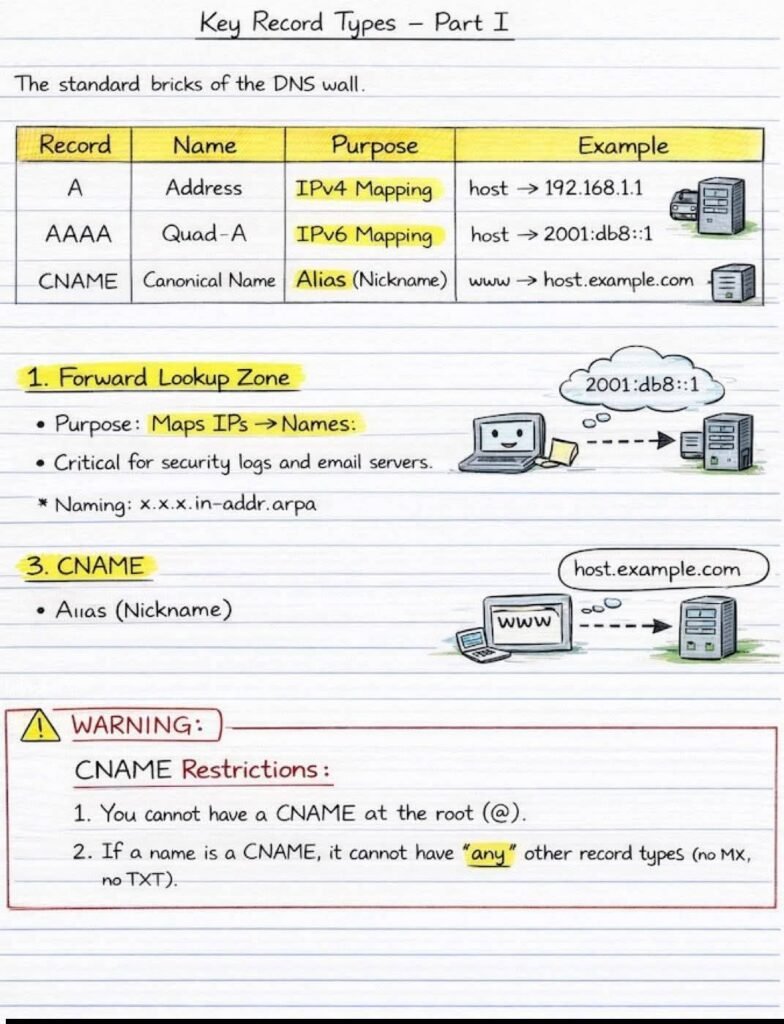
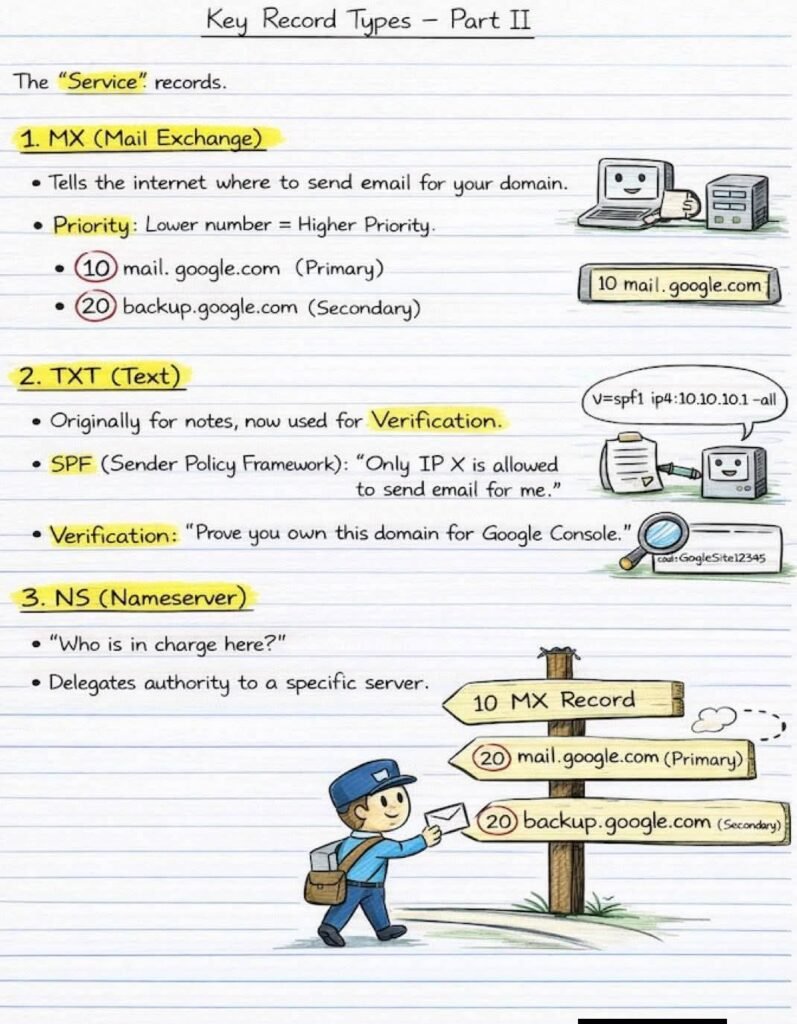
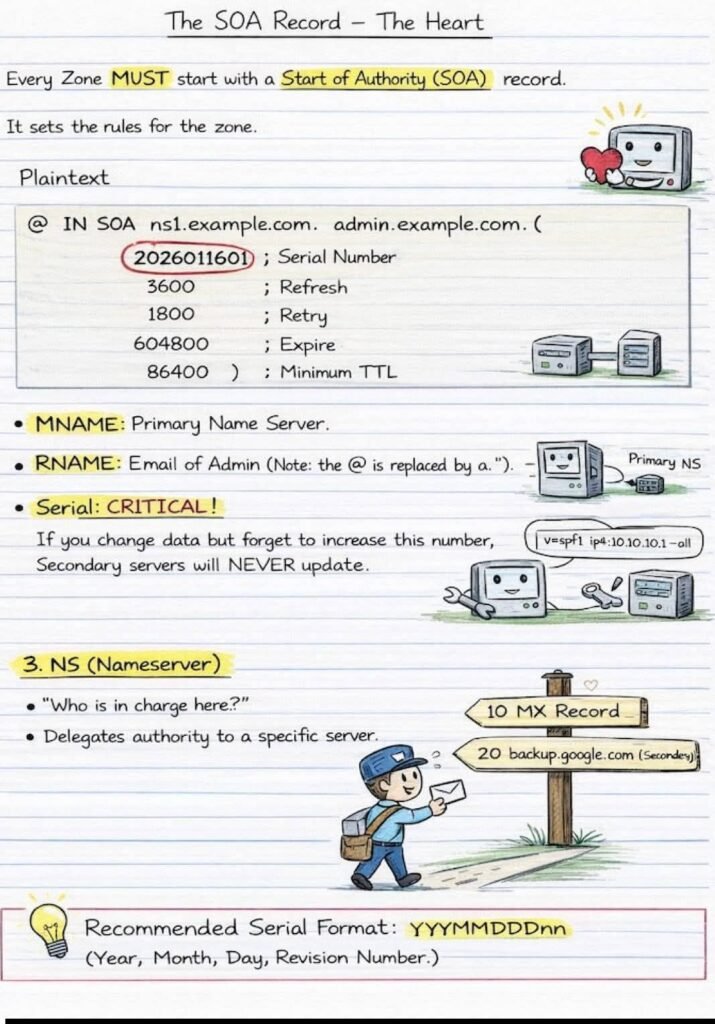
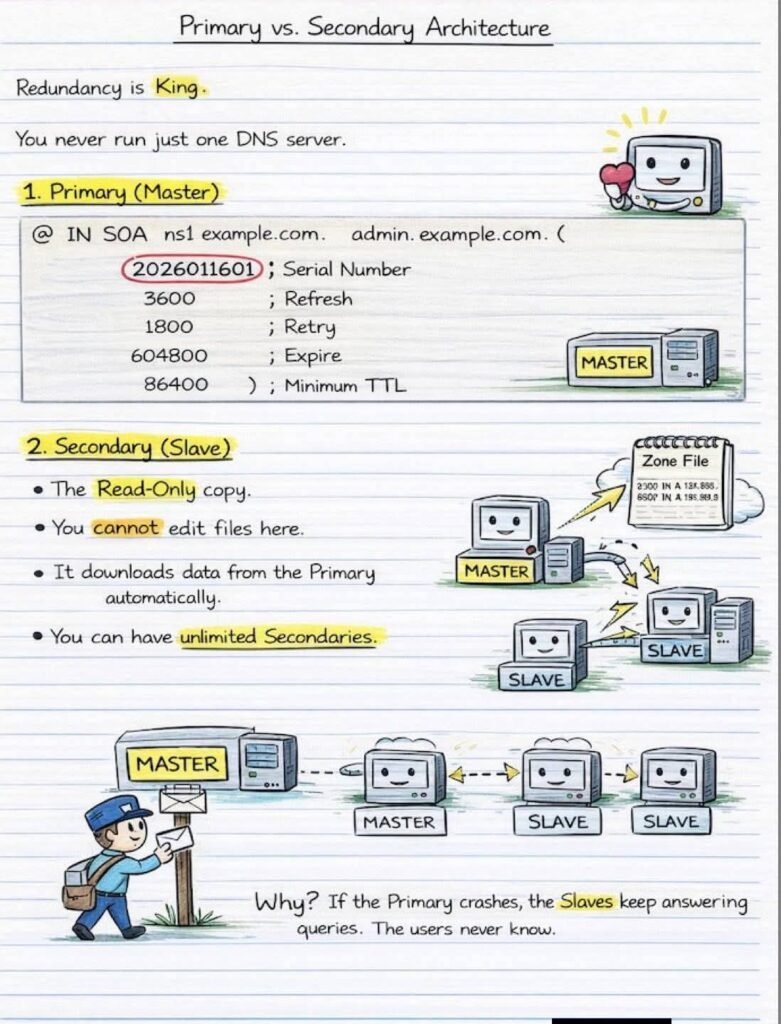
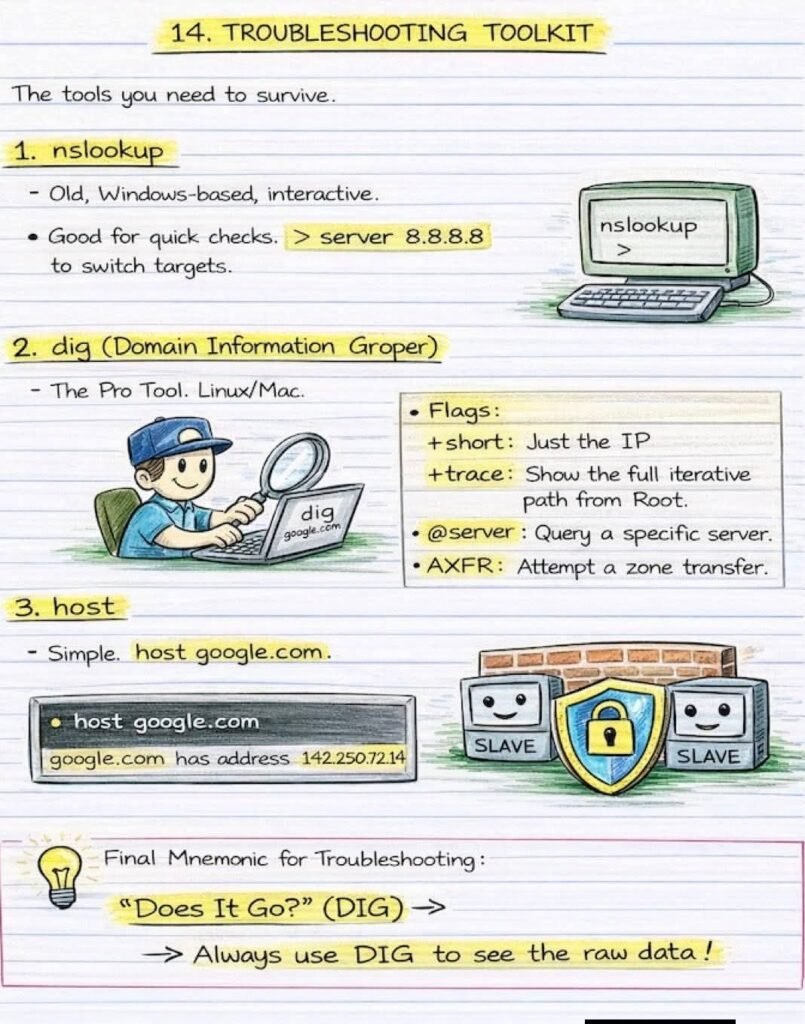
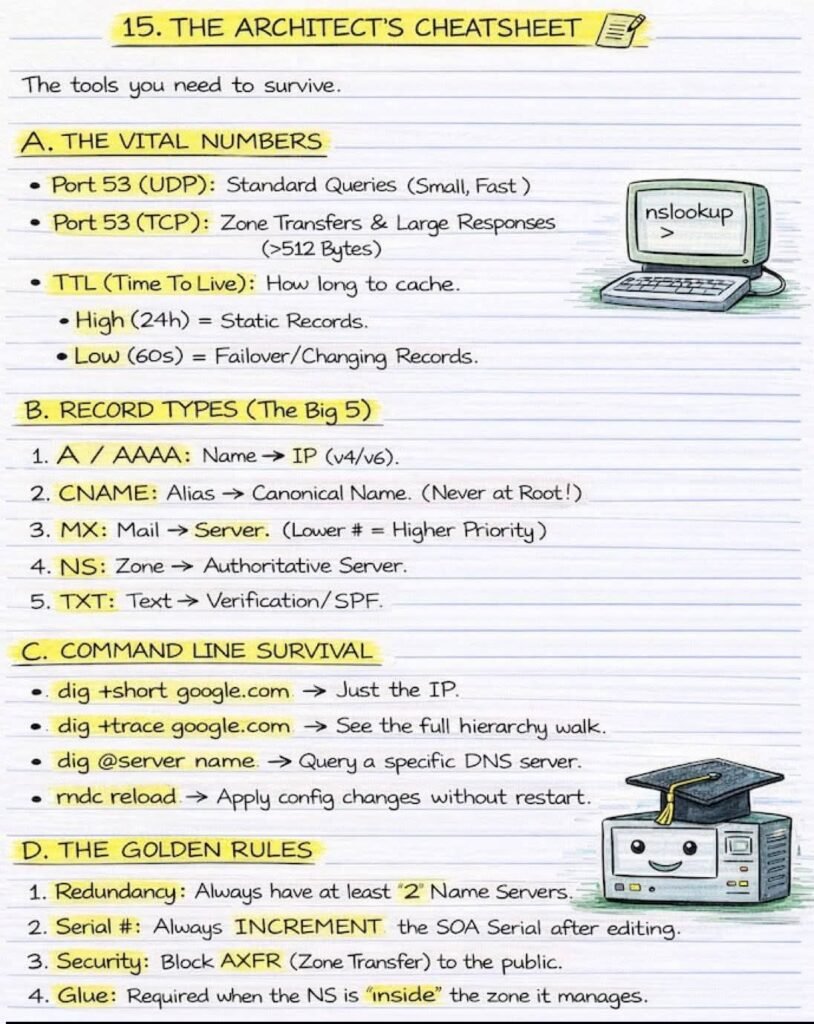
DNS from Basics to Enterprise Architecture – Everything in one Place!!!

DNS from Basics to Enterprise Architecture — Everything in ONE Place!

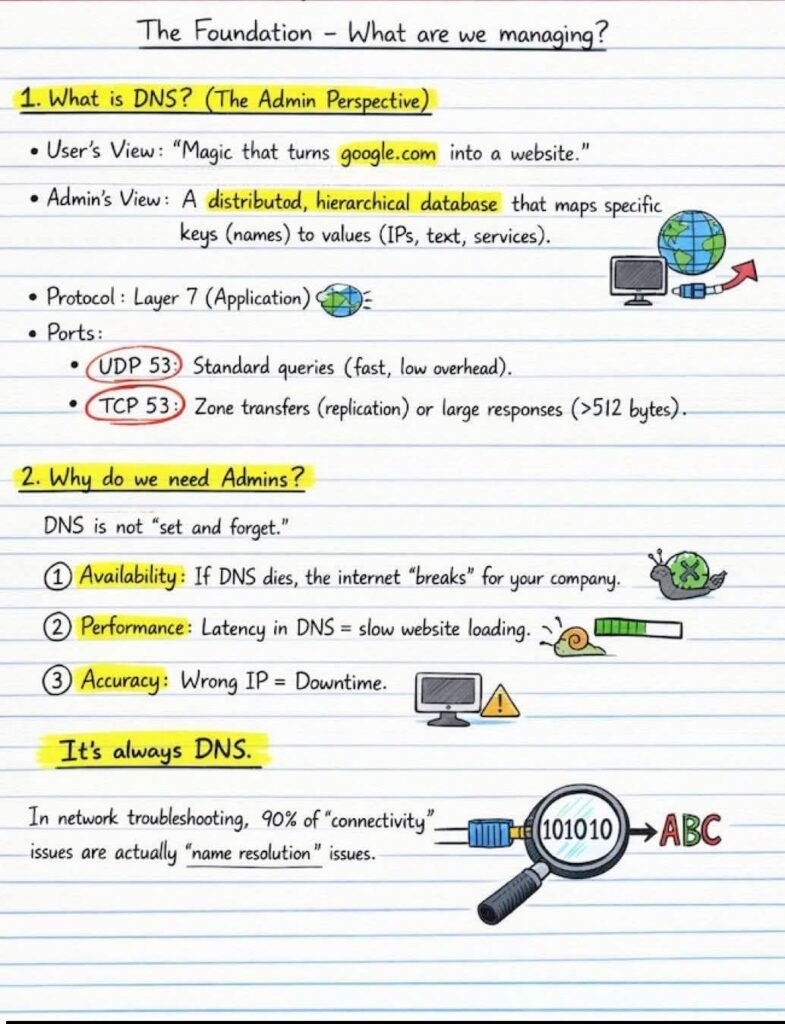
From “How does google.com open?” to “How do enterprises secure DNS at scale” — this post connects the full DNS journey

🔹 Start with the Core

  • What DNS really is (admin vs user view)
  • DNS hierarchy: Root ➝ TLD ➝ Domain
  • Key records: A, AAAA, CNAME, MX, TXT, NS
  • SOA record — the heartbeat of every zone

🔹 How DNS Actually Works

  • Local cache → Recursive → Iterative queries
  • Resolver, Root, TLD, Authoritative flow
  • Why “It’s always DNS” in troubleshooting

🔹 Enterprise & Advanced Concepts

  • Primary vs Secondary DNS (redundancy is king)
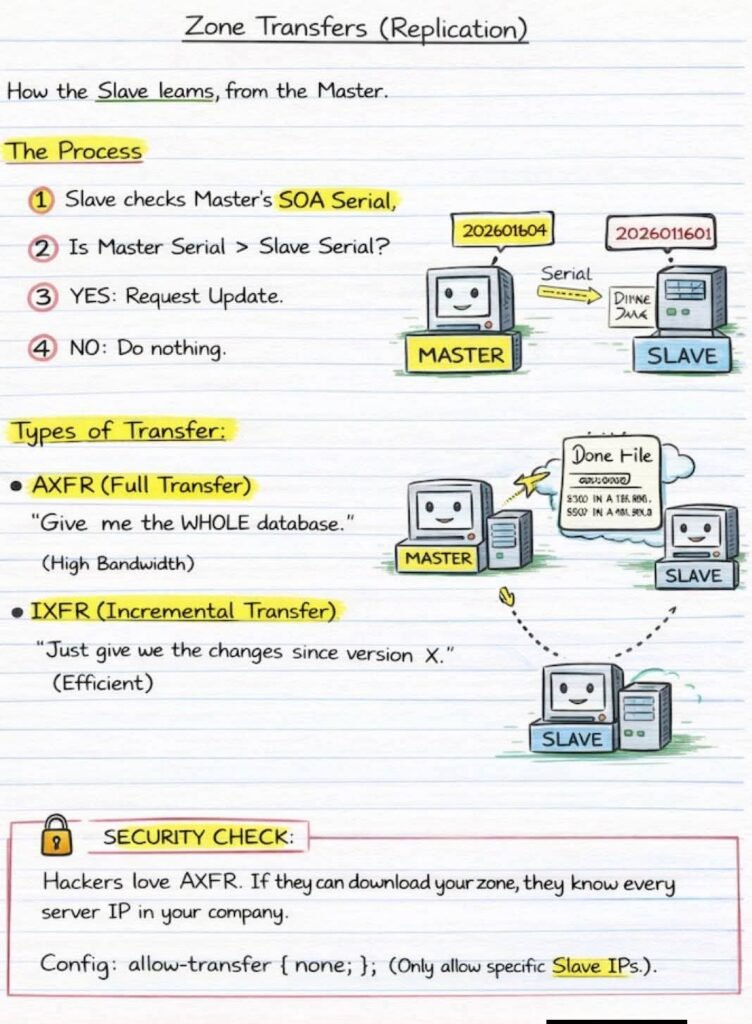
  • Zone Transfers (AXFR vs IXFR)
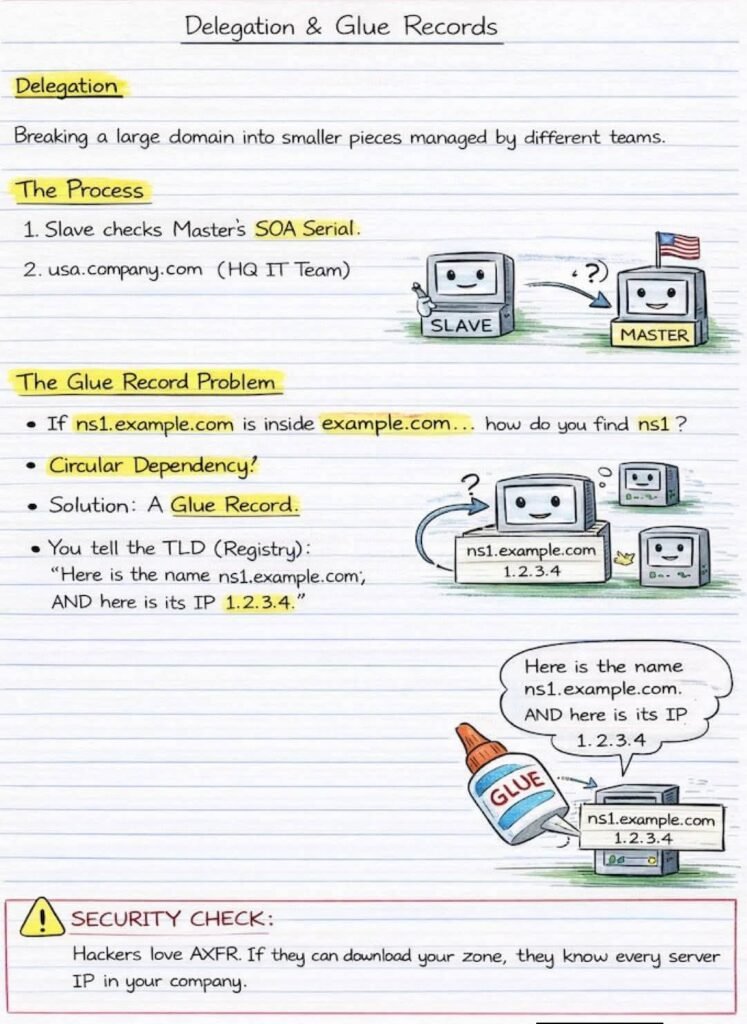
  • Delegation & Glue Records (no more circular dependency confusion)
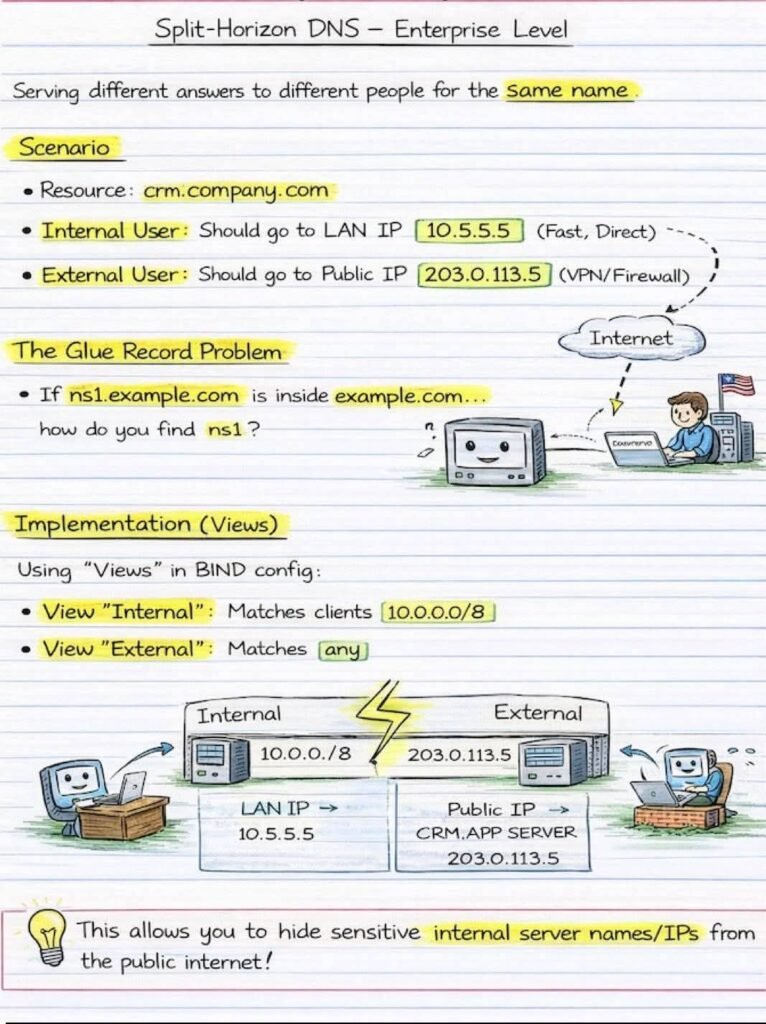
  • Split-Horizon DNS — same name, different answers (internal vs external)
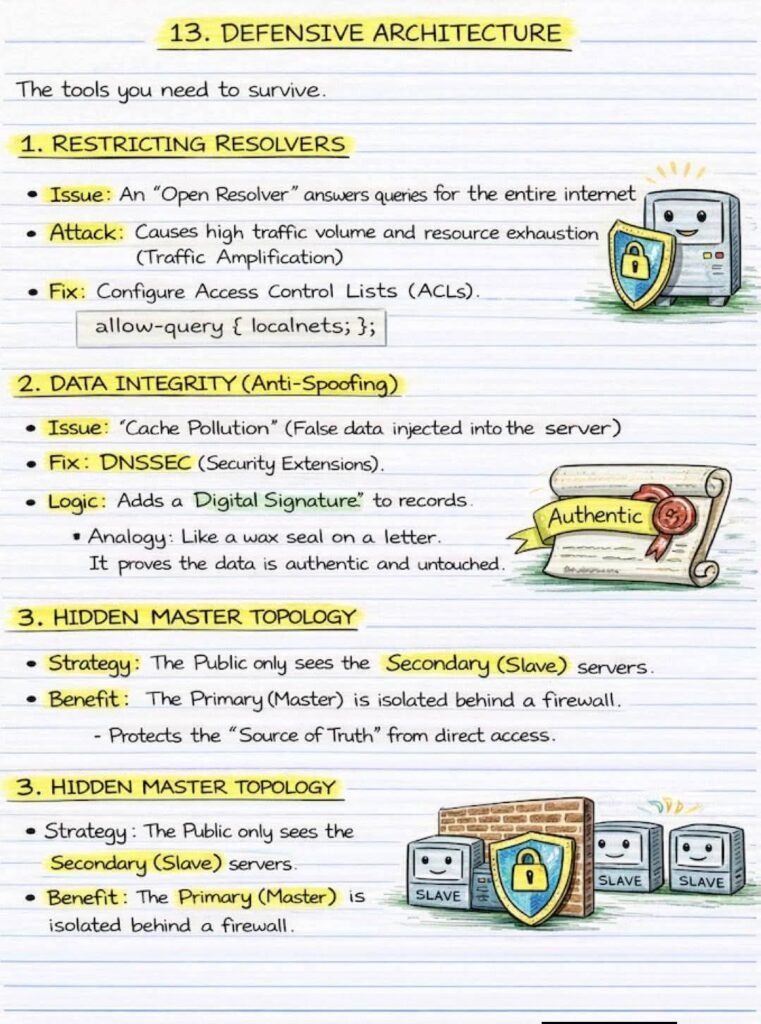
  • Hidden Master Architecture & DNSSEC

🔹 Real-World Survival Toolkit

  • dig, nslookup, host
  • Port 53 (UDP vs TCP)
  • TTL tuning, security hardening
  • Why misconfigured DNS = hacker’s playground.

🔹 One wrong DNS setting can cause:
❌ Downtime
❌ Security leaks
❌ Email failure

🔹 One solid DNS design gives:
✅ Reliability
✅ Performance
✅ SSecurity
✅ Scalability

FB IMG 1769639066219
News Update

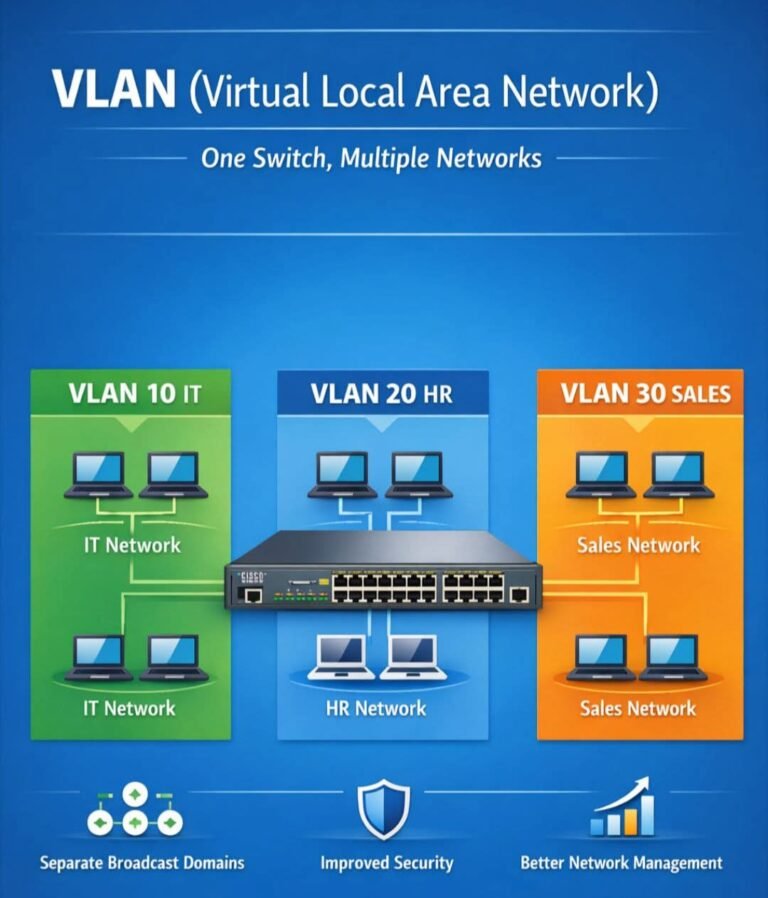
ONE SWITCH. MULTIPLE NETWORKS. ZERO CONFUSION.

This is the power of VLANs:

🔹 Same physical switch

🔹 Different logical networks

🔹 Better security, performance & control

🟢 VLAN 10 – IT

🔵 VLAN 20 – HR

🟠 VLAN 30 – SalesDevices stay isolated, broadcasts stay separate, and admins stay in control.That’s why VLANs are a must-know topic for CCNA & real networks

bluetooth
News Update

What Is Bluetooth

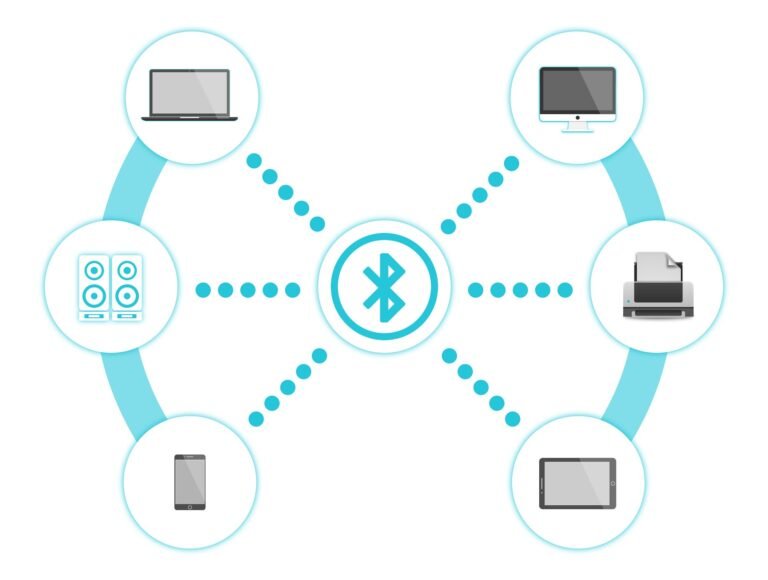
Bluetooth is a wireless technology used to connect devices over a short distance.
It allows devices to send and receive data without cables.
What Bluetooth is used for?
Bluetooth is commonly used to:
Connect phones to earphones/headsets
Share files between phones
Connect keyboard, mouse, speaker, smartwatch to a phone or computer
Connect devices in cars (hands-free calling, music)
It works using radio waves over a short range (usually about 10 feet).
Who invented Bluetooth?
Bluetooth was invented in 1990s by Dr. Jaap Haartsen, an engineer working at Ericsson, a Swedish telecommunications company.
The name “Bluetooth” comes from a Viking king, Harald Bluetooth, who united Denmark and Norway just like Bluetooth technology unites different devices.

Why is it called “Bluetooth” ?

Harald Blaatandtranslated in English means “Bluetooth”

A.D. 940-981

a king of Denmark and Norway

Brought Christianity to Scandinavians to harmonize their beliefs with the rest of Europe.

symbolize the need for harmony among manufacturers of WPANS around the world.

Bluetooth

WhatsApp Image 2026 01 27 at 3.17.28 PM
News Update

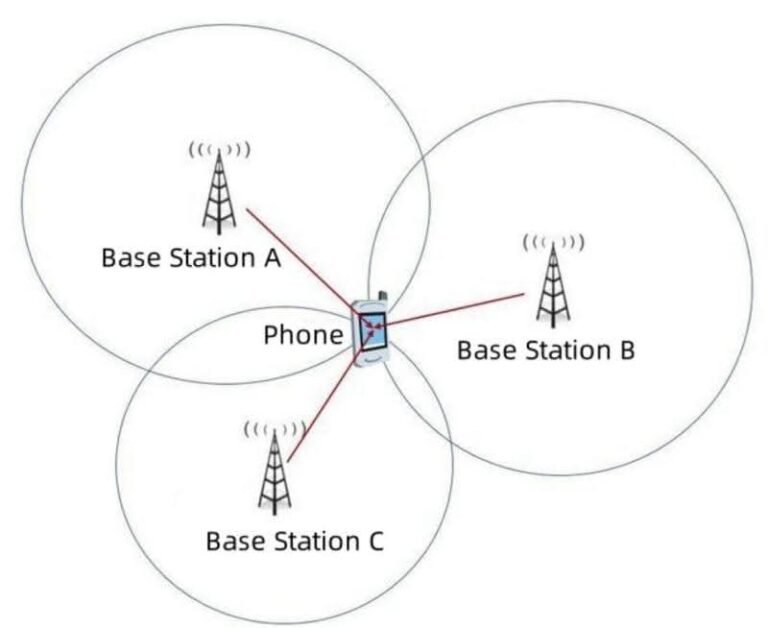
Why a Phone Does Not Always Connect to the Nearest Base Station?

Why doesn’t a phone always connect to the closest base station? A very common question from junior engineers is:

The short answer: distance is not the decision rule.

1️⃣ Signal quality matters more than distance

The nearest site may be:
• Blocked by buildings
• Using a different frequency band
• Experiencing strong interference

A farther cell can provide cleaner and more stable signal quality, which is more important than proximity.

2️⃣ Load balancing affects cell selection

Mobile networks don’t want all users on the same site.

If the nearest cell is heavily loaded:
• New users may be redirected
• Performance would degrade for everyone

Connecting to a less loaded cell often gives better real performance.

3️⃣ Cell selection is based on rules, not intuition

Phones follow network-defined criteria such as:
• Measured signal quality
• Priority and offsets
• Mobility and stability requirements

These rules are designed to keep the network stable and efficient, not “closest wins”.

4️⃣ Stability is preferred over frequent switching

If phones always chased the nearest cell:
• Handover frequency would explode
• Signaling load would increase
• User experience would suffer

Networks prefer fewer, stable connections over constant re-selection.

In short

Phones don’t connect to the nearest base station.
They connect to the best overall cell — balancing signal quality, interference, load, and stability.

Privacy Settings
We use cookies to enhance your experience while using our website. If you are using our Services via a browser you can restrict, block or remove cookies through your web browser settings. We also use content and scripts from third parties that may use tracking technologies. You can selectively provide your consent below to allow such third party embeds. For complete information about the cookies we use, data we collect and how we process them, please check our Privacy Policy
Youtube
Consent to display content from - Youtube
Vimeo
Consent to display content from - Vimeo
Google Maps
Consent to display content from - Google
Spotify
Consent to display content from - Spotify
Sound Cloud
Consent to display content from - Sound